banner
Meetings are Thursdays starting at Noon with room opening at 11:45 am at Comfort Inn in Plymouth.


Jim Crenna has provided a list of the prizes  for our raffle so far. We want MORE.
Prize
$1,000 Cash
$500 Holiday Gift Cards
$500 Foursome Clothing Gift Card
$500 Samaritan Gift Card
$500 Free Dental Care
$200 Von Hanson’s Gift Card
$100 Foursome Clothing Gift Card
$500 Free Dental Care
$100 Von Hanson’s Gift Card
$100 Visa Cash Cards
$50 Von Hanson’s Gift Card
$500 Free Dental Care
$50 Rock Elm Gift Cards
$500 Free Dental Care
$50 Visa Gift Card
$50 Visa Gift Card
$50 Target Gift Card
$25 Target Gift Card
 
We need more prizes so that nearly everyone wins something! If the basic ticket price is $10.00 and we have a huge number of even $10.00 prizes, people feel good about winning something and buy again next year. Tickets become easy to sell. Easy sales is good.
 
To energize sales we can send out tickets this week and people have time to mail back their entries before the parade.  To do a mail merge in MS Word: 
Step 1:
Save this table into your machine and fill it in with the names and details of your contacts that might buy raffle tickets:
First
Last
Street
City
St
Zip
Area
Tele


Step 2:
 
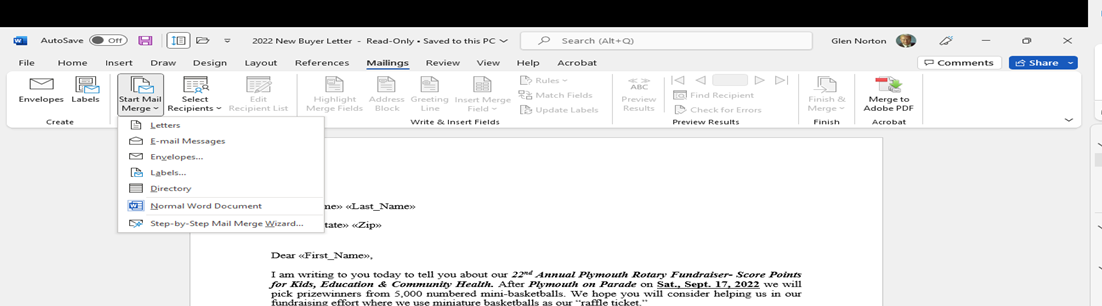
Write your letter like the ones Jim sent out in his e-mail of 8/17/22. Note the 'fields' that have << >> around them such as <<First_Name>>  etc.  Those correspond to the column in the table called "First" above.  When you have your letter open in Word, on the top bar find the tab called "Mailings" and click it to reveal what should look like this:


You should see something like this:


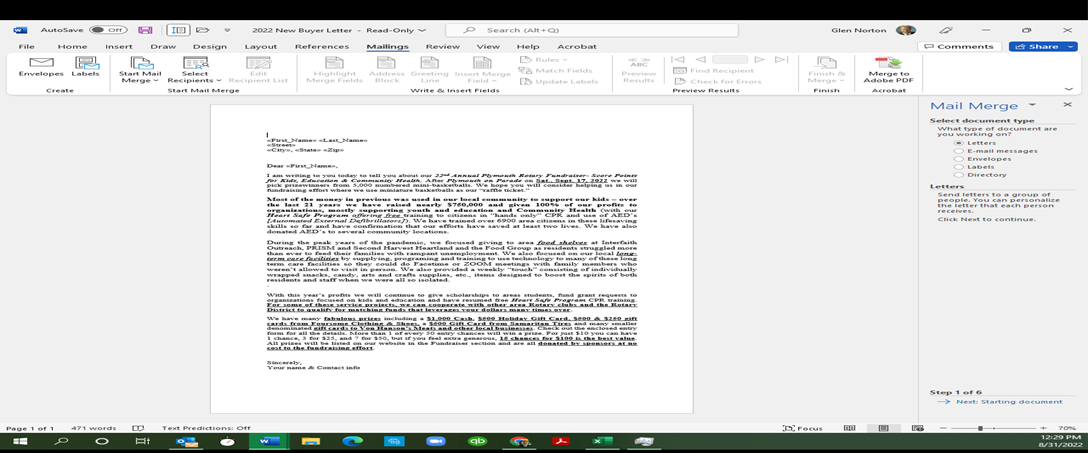
In this screen you should click step by step mail merge wizard. You will see this:
 
 
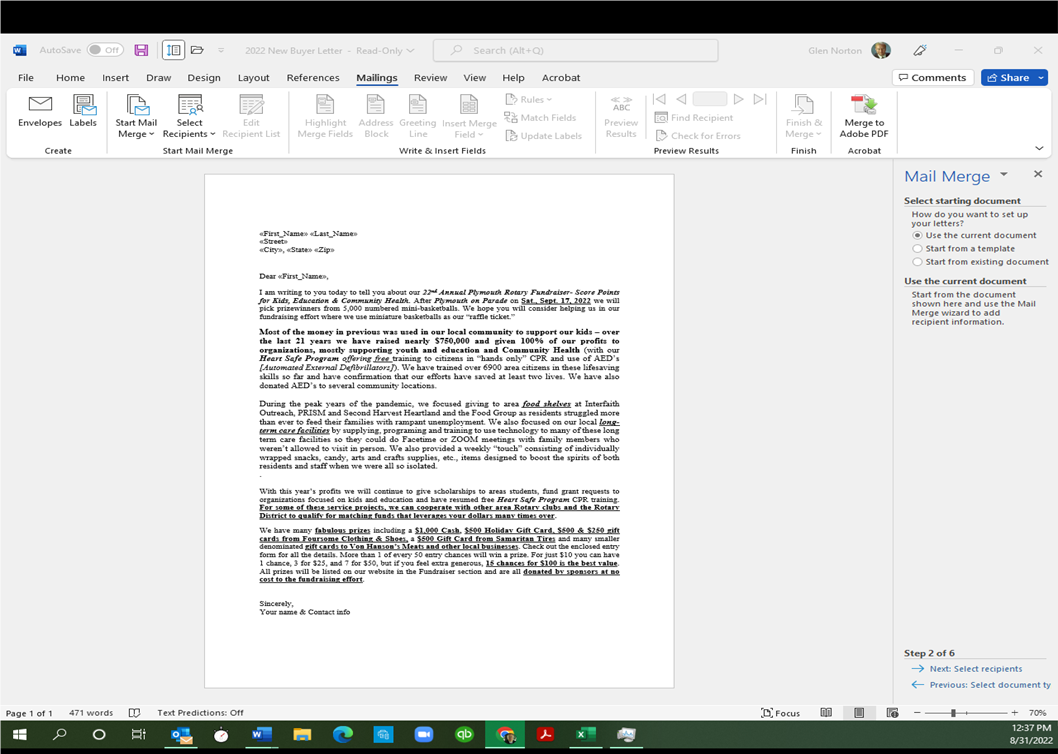
You will then click the bullet as shown for letters and then next at the lower right. It now wants to know what letter  to use. select this one on your screen by selecting the bullet shown and click "next" at the lower right when you have done that, as shown below.
 
 
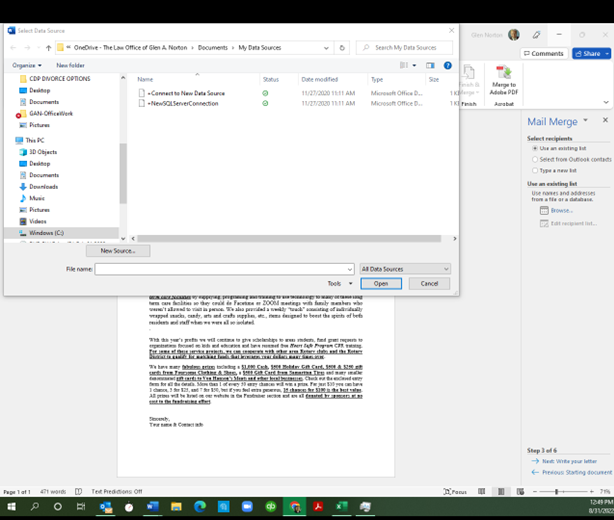
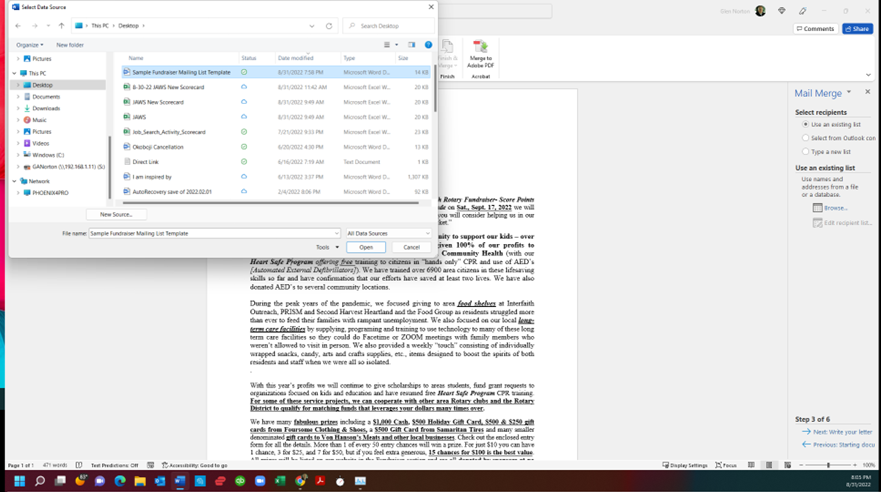
Now we select recipients. This can be done by browsing to the file where you stored them on your computer by clicking the top bullet on the right and then the "Browse under that section of the Wizard. When you do that you will see something like this:
 
 
Please browse to where you saved your list of adressees on your machine now in this panel and click on it. Click Open in the window. It will appear in the file name at the bottom when you do as shown below:
 
 
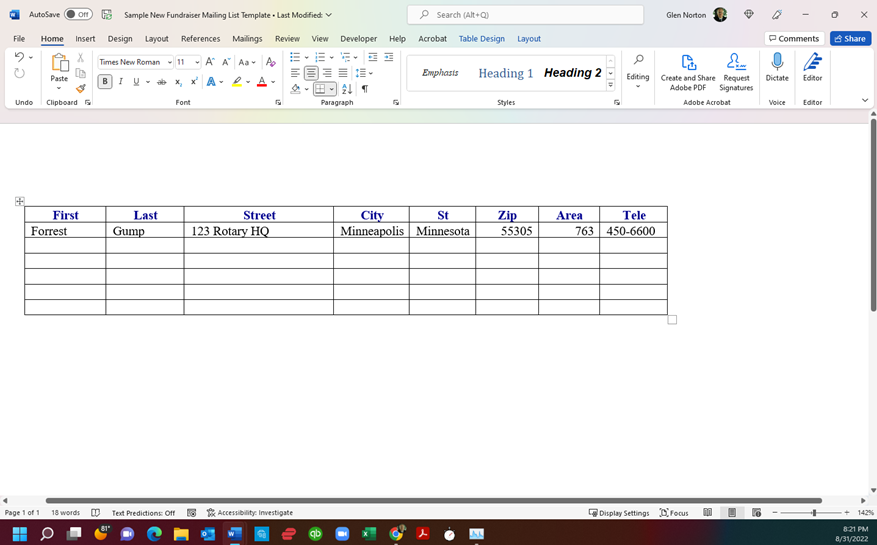
Note to be usable, your data table can not have notations at the top as the sample does. There should be NOTHING, not even extra spaces, between the top margin and the start of the table.
It must look like this:
 
 
I took my original and added the word 'new' to the name of the file when I saved it after adding my recipient Mr Forrest Gump in case something goes wrong. 
Then you will associate the fields in the letter with the fields in the table of adressees. This appears in a table like this below:
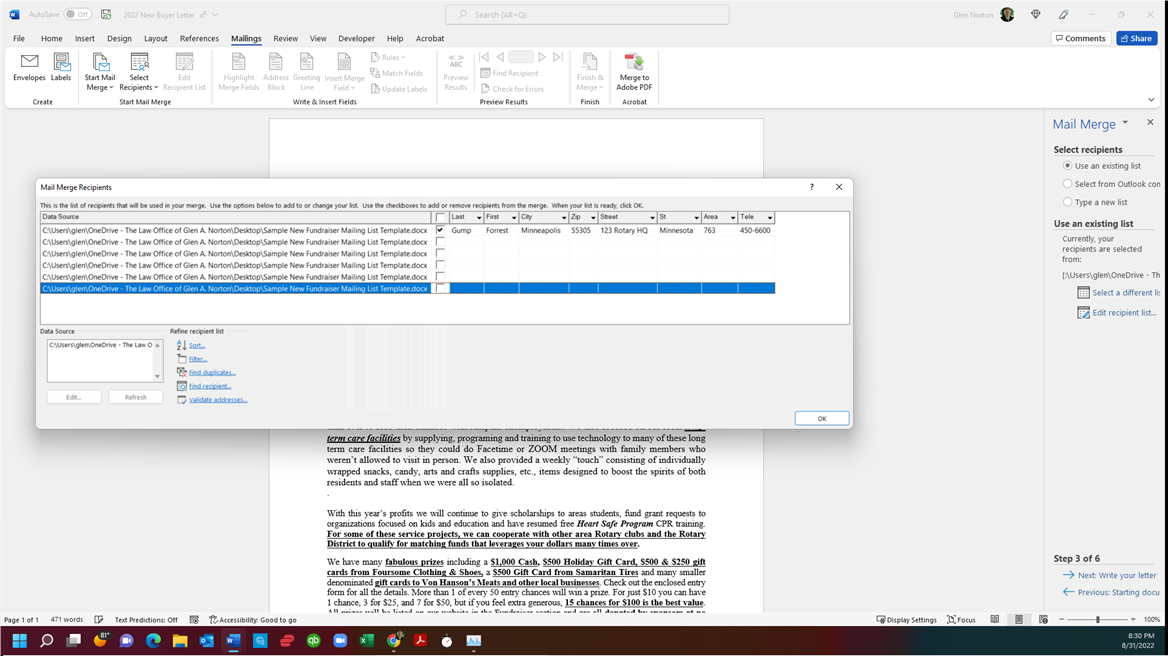


The path to my file is stupidly long on the left side of the chart but yours might not be.  you may need to use the arrow by hovering the cursor over the outer edge of the dropdown box to make it wider to read and confirm each recipient is correct, but you can do that here before wasting any paper. Notice we have  fields that are in the table that are unused in the letter such as telephone number and area code. Just make sure there are no fields in the letter that have no entries in the table. Some merge letters in the past have had nick names, such as when we call someone "Bud" when their name is William or something else. To follow our simple form here just enter Bud as their first name if that is more clear than their actual name. There is an "if then" function available but the hours it would take to make it work are beyond the added value it provides. The same applies to Mr. Ms. and Mrs. functions. 
 
 
At this point go ahead and cusomize your letter. Then click Next in the lower right hand corner of the wizard box.
Now you are at Step 4 Preview your whole letter (and all of them.) Click that Next preview your letter link. It will run through the first row of data as it sees it. 
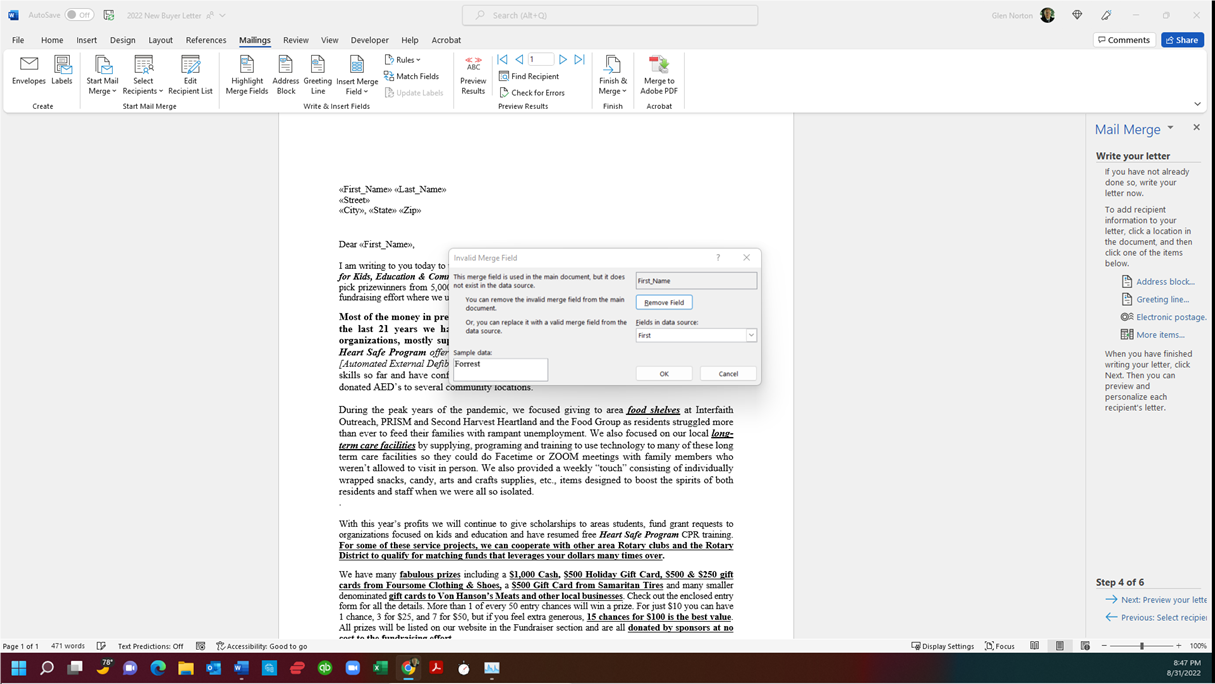


Here we have the machine complaining that the table we used said "First" and the letter we used calls for a field to fill from the table called "First Name." This is easily fixed without doing anything to either the table or the letter. You could go to either and change it to make it consistent with the other. You replace the reference by clicking OK in the objection box.  The repllacement can be adjusted in the third box down from the top by clicking the small v and scrolling to the proper choice. Once you have gone through all of the fields in your letter a draft will be displayed all filled in. Check your spacing between words. That is the most common problem with the merge is that first and last name will be jammed togeter without a space between or the name will be jammed up tight to the greeting. This is fixed by adding a space to the letter template form and it goes in before or after the << or the >> symbols. WHen your drafts look good, click the link in the wizard to complete the merge. 
 
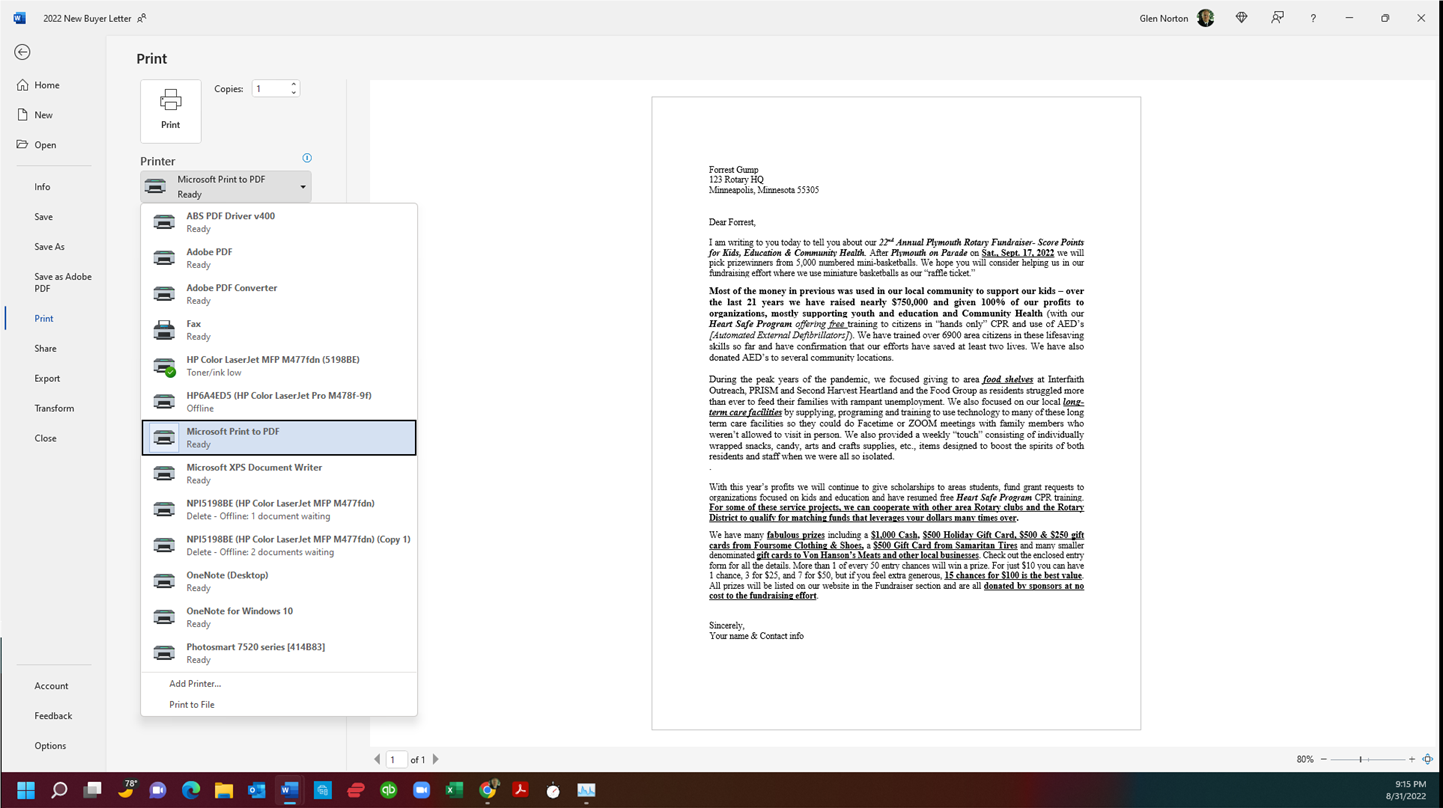
I suggest that you next print to a .pdf and save it to your desktop in case something goes wrong like you run out of letterhead in the printing. You do that by clicking File in the top ribbon on your screen. Scroll down pastHome, New Open Info Save Save As, and Save as PDF to Print. Your screen should look something like this when you click next to the printer: Be sure your appropriate printer has the green check as your default printer so you can get it back easily. Pick Microsoft print to PDF and save the file so you can reopen it after we make your envelopes.  


your other option is to use the wizard to merge to the printer directly and have the printout right away. You can edit individual letters in that way too.
 
 
TO MAKE YOUR ENVELOPES:
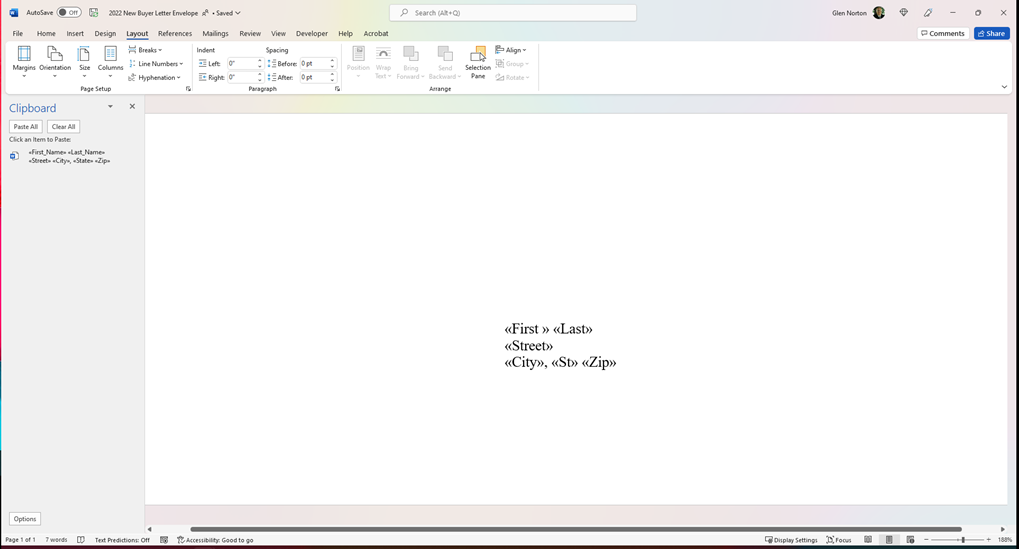
Repeat the same process. Use a teplate as shown below instead of the letter for the envelope. It is a number 10 envelope the left margin is 4" and the top margin is 2".
 
 
With this you can use the preprinted letterhead and feeed it through your laserprinter. Otherwise you cam print labels.


Here is our Speaker Calendar for the immediate future.
 
Board 9/1/22    
  9/8/22 Cathy Fischer Friends of the Plymouth Library
  9/15/22 Jim Crenna Final Prep for FUNdraiser & Parade
Parade 9/17/22
FUNDRAISER PARADE PLYMOUTH ON PARADE
 
  9/22/22    
  9/29/22
COMFORT INN AGREEMENT EXPIRES
 
Board 10/6/22 District Governor Lloyd Campbell Rotary Stuff of some sort

 
WE NEED MORE SPEAKERS NOW. 
 
Please let us know if you know of a good speaker for our club.  We have the letter prepared to send to you in word format so all you need to do is address it and sign and send it to the speaker confirming the date. We  also have thank you gifts in the form of our Rotary Luggage tags. 
 

The Mayor's 2022 Golf Outing is back!!
We are planning a golf event for the afternoon of September 29th at Eagle Lake, which is a 9 hole par 31.  We will plan to start at 2:00 that afternoon.  Please email me if you would like to golf at jwosje@cortrustbank.com.  Cost would be about $17. 
 
If we have enough golfers interested, we will play a best-ball/scramble type format!
In the past it has been a blast of fun for us all. You need not be the best golfer, the company is so good no one notices a bad tee shot or putt. 

 
Rotary Club of Plymouth Members,
 
Please take a moment to click on the link below that will take you to the new Club Facebook page!!  Once on that page we encourage you to “Follow” the page and “Like” the page as well! (Just click on the appropriate spots on the page).  Feel free to share this message with others that you know to increase the reach of Rotary Club of Plymouth information and also encourage new people to join the Club!


If you have any questions regarding the link or the page please contact Dave Kiser at 763-278-4169 or dkiser@ccxmedia.org.
 
Thank you!


Please check your heart. Is it beating?
If it is you should be giving to the Rotary Club of Plymouth Foundation so that if it suddenly stops someday there will be someone who is trained and has the equipment available to get it started again.
 

Heart Safe Note:
 

City of Plymouth
News Release

For Immediate Release  

Dec. 17, 2021

 Contact: Erik Fadden

Public Safety Director

City of Plymouth

763-509-5188

 
Free CPR training available in 2022
 
Plymouth, Minn. – Heart Safe Plymouth, a partnership of the Plymouth Public Safety Department and Rotary Club of Plymouth, has announced free CPR/AED training dates for January, February and March 2022.
 
The training sessions are open to teenagers and adults who are interested in learning to help save lives. Participants may register for one of the following training dates to learn hands-only CPR – chest compressions without mouth-to-mouth breaths – and how to use an Automated External Defibrillator (AED).
 
Weekday Training Sessions
The weekday training sessions below are set for 7-8:15 p.m. on the second floor of the Plymouth Public Safety Building, 3400 Plymouth Blvd. Class sizes are limited to 25 participants. To register, visit heartsafeplymouth.eventbrite.com.
 
  • Tuesday, Jan. 4
  • Monday, Jan. 24
  • Thursday, Feb. 17
  • Thursday, Feb. 24
  • Thursday, Mar. 10
  • Thursday, Mar. 17
 
Saturday Morning Training Sessions
Training sessions are set for 10-11:15 a.m. the following Saturdays in the Medicine Lake Room at Plymouth City Hall, 3400 Plymouth Blvd. Class sizes are limited to 40 participants. To register, visit heartsafeplymouthsaturday.eventbrite.com.
 
  • Jan. 22
  • Feb. 26
  • Mar. 19
 
COVID-19 Precautions
Registrants who are sick or experiencing COVID-19 symptoms, or who have had close contact with someone who has tested positive are asked to cancel their registration and stay home.
- More -
 
Heart Safe Plymouth Background
More than 6,600 participants have been trained through Heart Safe Plymouth. Plymouth was designated a Heart Safe Community in 2013 by the American Heart Association. The program recognizes efforts to improve systems for preventing deaths caused by sudden cardiac arrest.
To schedule a free training session for a group or business, call 763-772-7671 or email heartsafeplymouth@gmail.com. For more information about the Rotary Club of Plymouth, visit rotaryplymouth.org.


WHAT HAS OUR CLUB DONE FOR THE COMMUNITY LATELY? We have just this week approved a grant to buy two picnic tables for Mission Nursing Home of Plymouth. These will replace ones that are dangerous for elderly nursing home patients that would like to use them with their family members during this good weather season. We are buying two tables as requested. As to each table 
  1.  It is shipped unassembled. 
  2. Mission staff will assemble when it is received.
  3. The optional kit to secure it to the concrete pad is not necessary. 
  4. The table is 400+ pounds.  It’s not going anywhere.
  5. This product is similar to the By The Yard products made here in MN. 
  6. Carol checked with By The Yard, and the only picnic table they have is a one piece, hexagonal shaped table with attached seating.  Not possible for those using wheelchairs/walkers to access. These are better for our purpose.
  7. This product is what is used by the City of Plymouth in their parks. 
  8. It is rated to be outdoors in MN 24/7.
  9. These tables are ADA compliant.
 
We have another grant application from another deserving entity the committee is reviewing as well. More details will be coming soon.


By being a member of Rotary you are a part of an organization that is constantly doing something good.
 

TALKING POINTS:
 
What is Rotary and WHY WOULD ANYONE CARE?
Rotary is a philanthropic organization that has a core group of committed volunteers in nearly every developed city in the world, who work to make their community a better place.
Here are 3 reasons for your friends to care: 
  1. If you have moved here from somewhere else, and you join a local club, you can plan and do projects involving friends locally with those from anywhere you came from.
  2. Or for another example, when your local food shelf needs something, or someone, who can they ask and where do volunteers come from? Rotary Clubs supply money and volunteers for all sorts of our community charities.
  3. Rotary tries to measure everything with its four-way test. 1) Is it the truth? 2) Is it fair to all concerned? 3) Will it build good will and better friendships? 4) Will it be beneficial to all concerned? If something fails in any of those dimensions, it does not meet Rotary’s high-quality standards. We have been honored and welcomed to join.


THE OBJECT OF ROTARY
The Object of Rotary is to encourage
and foster the ideal of service as a
basis of worthy enterprise and, in
particular, to encourage and foster:
First The development of
acquaintance as an opportunity for
service;
Second High ethical standards
in business and professions, the
recognition of the worthiness
of all useful occupations, and
the dignifying of each Rotarian's
occupation as an opportunity to
serve society;
Third The application of the ideal of
service in each Rotarian's personal,
business, and community life;
Fourth The advancement of
international understanding,
goodwill, and peace through a
world fellowship of business and
professional persons united in the
ideal of service.
 

Our application and materials are in for Javier! We will know about our latest hurdle soon and that is when it is all funded! This is a fantastic opportunity for us to interact with the British Rotary Club, Javier as he goes through his latest level of higher education, and the district committee as they finalize the funding of the grant. Carol has led us through a difficult process to a great result. Many thanks to Carol. 
 

If you are receiving this Bulletin and you are no longer a member, or never were a member, the reason it is coming to you is that we want you to consider becoming a member now. We want you in our club. If no one has personally said it recently, consider this your invitation to come as soon as you can. You are important to us.

 
Carol would like to build a schedule to deliver donated flowers to assisted living and nursing homes. Flowers are available Thursdays at 8:30 am at Trader Joe's, 11220 Wayzata Blvd. (Hopkins Crossroads and 394).  Email Carol Parrish  cjparrish1029@msn.com


LUNCH:
 
To order lunch from Lucky's 13, click on this link, order, pay and pick up at restaurant upon arrival.  Beverages are not available when ordering online.  Our room will have water available.  We can not bring food from another establishment into the weekly meetings. 
 
Meetings are held in-person at Comfort Inn in Plymouth.  Comfort Inn requests those who are not fully vaccinated to wear a mask when not eating.
 
Thank you for being a part of Plymouth Rotary Club!
 
Co-President, Glen Norton
Co-President, John Schoonover


Rotary Core Values:  Fellowship, Integrity, Diversity, Service, Leadership
​
The Four-Way Test of the things we think, say or do:
 
1  Is it the TRUTH?
 
2  Is it FAIR to all concerned?
 
3  Will it build GOODWILL and BETTER FRIENDSHIPS?
 
4  Will it be BENEFICIAL to all concerned?
Type caption here
Add text here
Birthdays & Anniversaries
Member Birthdays
John Packard
August 8
 
Shawn Ruby
August 17
 
Virginia Antony
August 18
 
Anniversaries
Russ Carlson
Diane Carlson
August 1
 
David Olson
Mary
August 31
 
Join Date
John Packard
August 2, 1985
37 years
 
Partners
Plymouth MN Rotary
Thursdays at 12:00 PM
Comfort Inn & Suites
3000 Harbor Lane
Plymouth, MN
United States of America
Plymouth MN Rotary Board
Secretary
 
Advertisement for Russell Hampton
Advertisement for ClubRunner
Advertisement for ClubRunner Mobile